
RainAware
RainAwareWeather
3.588.00 Reviews
- Version
- 2.1.7
- Installs
- 10.00K
- Age Rating
- Everyone
Screenshots
Our Review of RainAware
 Analysis by Appyee
Rain can disrupt a short walk, a commute, or an outdoor plan more than a broad daily forecast suggests. I’m most interested in weather tools that help answer a practical question: should I leave now, wait a little, or take a jacket? RainAware is built around that kind of decision, with rain timing at a specific location rather than just a general outlook. It is a paid weather app from RainAware, and its focus makes it most useful when precipitation is the thing that could change your plans.
What speed feels like in everyday use
For a quick check before heading out, responsiveness matters more than a long list of charts. In my experience, the app opens promptly and puts the map and rain information close to the front of the experience. That suits the moments when you are standing by the door, not settling in to study the weather. Still, a fast launch should not be mistaken for a guarantee that every forecast will be right: local showers can shift, and a timing estimate is a planning aid, not a promise.
The main advantage over a standard weather app is the question it prioritizes. Many general forecasts are good at showing the day’s overall chance of rain, but that can leave you guessing about whether a particular trip will be dry. RainAware makes timing and nearby movement more central. I would use it alongside a broader forecast if I also needed temperatures or a full picture of the week, rather than expecting a rain-focused tool to replace every weather check.
When the map has to do more work
The app is most compelling when rain is close enough to affect a decision. For example, if I have a short walk to a bus stop and a longer wait outdoors, I can check whether leaving immediately seems sensible or whether a brief delay might help. For a gardener deciding whether to water, or someone choosing when to bring laundry inside, that short-range perspective can also be more actionable than a daily icon.
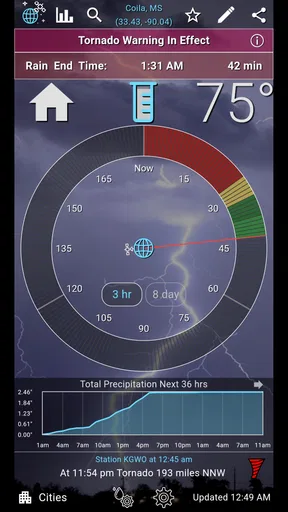
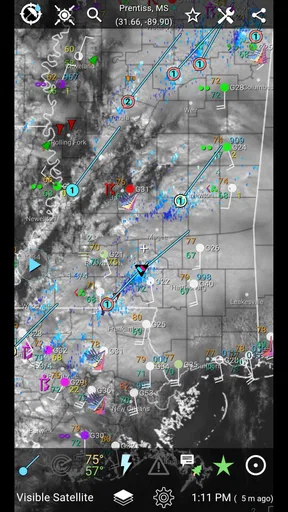
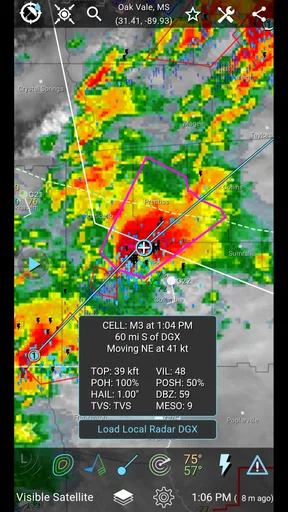
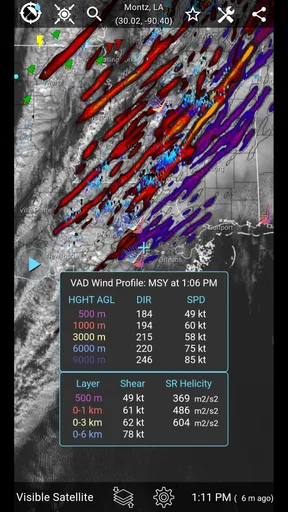
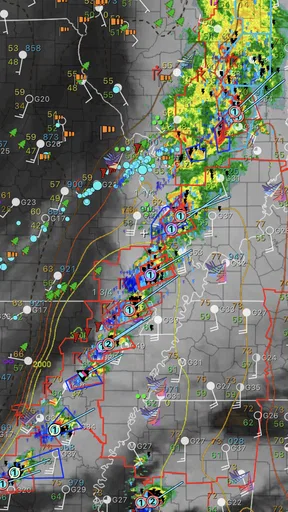
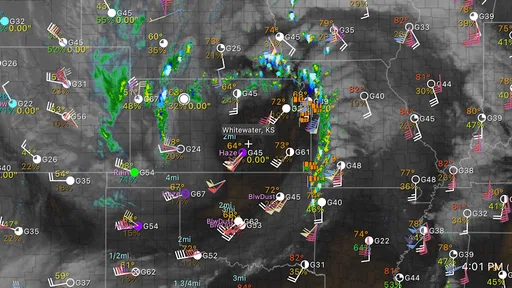
Radar and satellite views offer different kinds of context: one helps me follow precipitation, while the other gives a broader view of weather patterns. Lightning and storm alerts matter most when an ordinary rain shower is no longer the only concern. My useful habit is to check the local timing first, then widen the view if the situation looks unsettled. That keeps the decision practical instead of turning every glance into a deep dive through weather layers.
Reliability means reading the forecast sensibly
Rain timing is inherently more fragile than a broad statement about the day. A shower can form, fade, or change direction, so I would treat the estimate as guidance and check again before a time-sensitive outdoor activity. If the map and the timing seem to tell different stories, I would avoid making a tight plan around either one. The strongest use is deciding whether a small change of schedule is worthwhile, not deciding that a long trip is certainly safe from weather.
Notifications can be useful when I am busy, but I would keep them focused on conditions that genuinely change what I do. Too many alerts can become background noise, especially if I am already checking the app regularly. For a hike, event, or drive where conditions could matter beyond a quick shower, I would also consult an official local warning source. A convenient radar view is not a substitute for taking serious weather alerts seriously.
Who will get the most from it
This is a better fit for someone whose plans often depend on the next stretch of rain than for someone who only checks the temperature once a day. Walkers, cyclists, people with outdoor jobs, and anyone moving between home, work, and transit may appreciate having rain timing close at hand. If you prefer one simple screen with a broad daily forecast, a familiar general-purpose weather app may feel easier and provide a wider range of everyday information.
There is also a sensible case for keeping both kinds of app. A broad forecast helps me compare the day and plan ahead; RainAware is more useful when I am deciding what to do in the near term. That division avoids expecting one tool to excel at everything. If you rarely make plans around rain, the specialized focus may not justify paying for another app. If a few minutes of timing can spare you a wet walk or help you choose when to leave, that focus is easier to appreciate.
First Impressions and User Interface
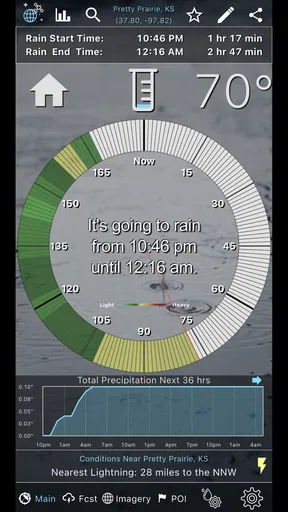
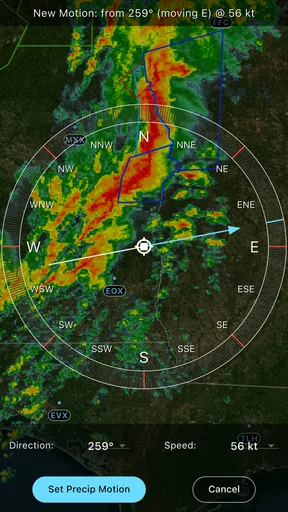
Upon launching RainAware, I was greeted with a sleek and intuitive interface. The app's design is straightforward, making it easy for anyone to navigate, even if you’re not a tech wizard. The main screen displays a real-time radar, which is surprisingly detailed. The color-coded map allows you to quickly assess weather conditions, making it a breeze to plan your day.
One of the first things I noticed was how quickly the app loaded. This might not seem like a big deal, but when you’re rushing out the door, every second counts. The app doesn’t bombard you with ads or unnecessary pop-ups either, which is a huge plus in my book.
Features That Stand Out
Now, onto the meat and potatoes of the app—the features. RainAware claims to provide hyper-local forecasts, and I was eager to test this out. The app uses your GPS location to give you precise weather updates for your exact spot, and boy, does it deliver!
One of the standout features is the “Rain Timer”. This nifty tool tells you exactly when rain will start and stop at your location. I tested it a few times, and it was eerily accurate. It's perfect for those moments when you need to decide if you'll make it to the car before the skies open up.
The app also includes a radar animation that predicts weather patterns for the next few hours. It's fascinating to watch, and more importantly, it helps you see if that storm is really heading your way or just passing by.
Performance and Reliability
Performance-wise, RainAware is solid. It didn’t crash once during my review period, and the updates were prompt and reliable. The app pulls data from multiple weather sources, so you’re not just relying on one prediction, which boosts its accuracy.
I also appreciated the customization options. You can tweak the settings to get notifications for different weather conditions. Whether you’re a casual user or a weather enthusiast, you can tailor the app to suit your needs.
Room for Improvement
While RainAware is pretty impressive, it’s not without its quirks. The app is currently available only in certain regions, so if you’re traveling abroad, you might not get the same level of detail. Additionally, some users might find the plethora of features a bit overwhelming at first.
Another thing to note is that while the app offers a lot of free features, some advanced functionalities require a subscription. This is pretty standard in the app world, but it’s something to consider if you’re on a tight budget.
What to check before relying on it
There is a useful distinction between seeing rain near you and knowing what will happen at the exact point you care about. A radar sweep can show a band moving across the area, but your route may cross it at a different time from your starting point. I would check the map with the destination in mind, then revisit the timing if I am leaving later than planned. That simple workflow is more dependable than treating one glance at home as a forecast for an entire outing.
On a typical workday, imagine clouds building while you are finishing a meeting and you have a walk to the station afterward. I would use the timer to decide whether to head out right away, then use the radar animation to judge whether the weather seems to be approaching or moving away. If the rain looks widespread or a storm alert appears, I would switch from trying to beat the shower to choosing a sheltered route or postponing the walk. The app helps structure that decision; it cannot remove the uncertainty of changing weather.
That is also why I would avoid leaving notifications on for every possible condition without first seeing how they fit my routine. A useful alert should change an action: bringing a coat, moving a task indoors, or leaving earlier. If it only repeats information I already see, it adds interruption without much value. Choosing a small number of relevant alerts is a practical way to make the app feel calmer during a busy day.
Price, compatibility, and expectations
The app costs $4.99, so I would decide based on how often precise rain timing would genuinely help. Its average rating is 3.5 from 154 ratings, with 87 written reviews, which suggests a mixed reception rather than universal satisfaction. It has passed 10K installs and is rated Everyone. Those details do not tell me whether it will suit a particular person, but they do make it sensible to weigh its focused purpose against the price instead of treating it as an automatic download.
RainAware is at version 2.1.3 and requires Android 10 or later. That requirement is worth checking before paying, especially if you use an older phone or keep a spare device for travel. The app also lists in-app purchases ranging from $0.99 to $69.99 per item, so I would look carefully at what an optional purchase offers before committing. The base price and any extra purchase are separate decisions; neither should be assumed necessary for every user.
Because location is central to precise local guidance, I would make sure the app can use a location setting that gives useful results while still matching my comfort level. If I prefer not to use precise location, I would check how well a manually chosen or less precise area serves my routine before depending on it. For travel, I would test the app after arriving rather than assume the same level of detail everywhere. The original experience notes that coverage can vary by region, which is a real limitation for people who move between countries or less familiar areas.
Where a general forecast is still better
For planning a weekend several days away, a wider forecast is usually the more useful starting point. I want to compare likely conditions across the day, not focus narrowly on the next rain band. Likewise, anyone who mainly needs a quick temperature check, a week view, or a broad set of everyday weather details may find a general weather app more convenient as their only installation. RainAware earns its place when rain timing is the decision, not merely because it is another way to display weather.
Its radar animation is also something I would use with restraint. Watching movement can help explain why a timer is changing, but it is easy to mistake a smooth animation for certainty. A forecast map is still an interpretation of weather, and small showers are especially difficult to plan around exactly. When timing matters only for a short errand, a fresh check just before leaving is a reasonable habit. For exposed activities or severe conditions, I would prioritize official warnings and local guidance over any single app screen.
Final Thoughts
All in all, RainAware is a fantastic tool for those who want to stay one step ahead of the weather. Its accurate predictions and user-friendly interface make it a must-have for anyone who’s tired of getting caught in the rain. While it might not be perfect, its strengths far outweigh its minor drawbacks.
If you're looking for a reliable weather app that does more than just tell you the temperature, RainAware is definitely worth a download. It’s like having your own personal meteorologist right in your pocket.
My practical verdict
I would recommend it most readily to someone who makes frequent, short-range decisions around showers and is comfortable checking a specialized forecast before heading out. Its strongest value is not replacing every weather tool, but reducing guesswork about whether rain is close enough to alter a plan. Used that way—with a fresh look at the map and sensible caution around alerts—it can be a handy companion for commuting, errands, and outdoor work.
I would skip it if I only wanted a free, all-purpose forecast, if my device does not meet the Android requirement, or if I need dependable detail while traveling through areas where coverage may differ. The paid entry point and optional purchases also make it less appealing to casual checkers. My overall view is positive but qualified: it has a clear job and a useful way of presenting near-term rain, yet its specialized focus and the natural uncertainty of local weather mean it will not be the right answer for every forecast question.
Verdict
Strengths of RainAware
- Accurate real-time weather updates.
- User-friendly interface with intuitive design.
- Customizable alerts for severe weather.
- Minimal battery and data usage.
- Detailed radar maps for precise tracking.
Limitations of RainAware
- Limited free features; subscription needed.
- Occasional ad pop-ups can be distracting.
- Radar updates can be slightly delayed.
- Lacks global coverage; mainly US-centric.
- No offline mode for remote areas.
Similar Picks in This Category
View All
Weather - By Xiaomi
Xiaomi Inc.4.1

Weather & Radar Forecast
WetterOnline4.8

Weather
OneLouder Apps4.6

AccuWeather: Weather Radar
AccuWeather3.6

The Weather Channel - Radar
The Weather Channel4.6

1Weather Forecasts & Radar
OneLouder Apps4.3
Frequently Asked Questions
What platforms is RainAware available on?
RainAware is available for both Android and iOS platforms. Users can download it from the Google Play Store for Android devices and the Apple App Store for iOS devices. This ensures that a wide range of users can access the app's features and stay informed about weather conditions.
How accurate is the weather prediction on RainAware?
RainAware is known for its precise weather predictions, leveraging advanced algorithms and real-time data to provide hyper-local forecasts. The app is designed to predict rain down to the minute in your specific location, ensuring users receive timely weather updates to plan their activities accordingly.
Does RainAware offer any customization options?
Yes, RainAware offers various customization options to cater to individual preferences. Users can set personalized alerts for rain, change the interface settings, and choose from different notification sounds. These features allow users to tailor the app according to their specific weather monitoring needs.
Is there a subscription fee for RainAware?
RainAware offers both free and premium versions. The free version provides essential features, while the premium version offers enhanced functionalities such as extended forecasts and ad-free usage. There is a subscription fee for the premium version, which can be purchased within the app.
Can RainAware be used internationally?
RainAware is designed to work internationally, providing weather forecasts in multiple countries. However, the accuracy of predictions may vary depending on the availability of local data sources. It is advisable for users to check the app's supported regions and data accuracy for their specific location before relying on it for critical weather updates.
